
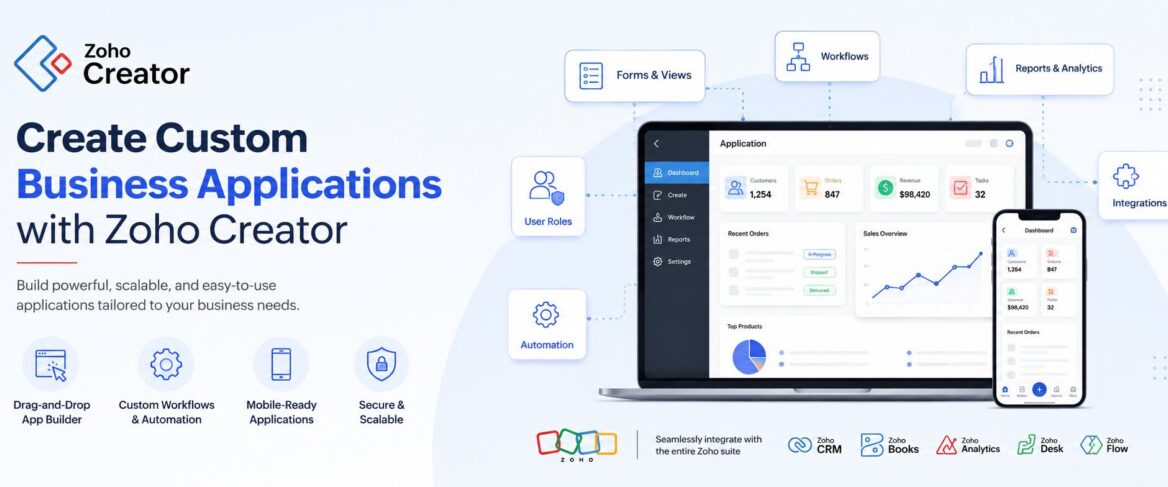
In the nascent stage, spreadsheets, emails, and disconnected applications are good enough to manage day-to-day business processes. But these tools cannot accommodate an expanding team and scaling operations in the long-term. Your existing software eventually falls short of supporting the process in the way the business needs. This is where a custom app development tool like Zoho Creator can fill the gap. It can truly help connect different business systems better than traditional software development.
What Is Zoho Creator?
It is a low-code application development platform built around the way a company actually works, helping with fast deployment of custom applications, automated workflows, data management, and more. With its help, you can have applications tailored specifically for each department - internal operations, sales, finance, HR, inventory, customer service, and others.
The platform provides visual development tools while also supporting deeper customization through Deluge and integrations. So instead of adapting a business process to a fixed software application, you can turn to Zoho Creator to build applications around data, workflows, approvals, reports, and business rules.
For example, consider a manufacturing company that manages distributor enquiries through emails and spreadsheets. The company could build a custom application to capture enquiries, assign them to sales representatives, track quotations, manage follow-ups, and provide management with dashboards.
The application is designed around the company's process rather than forcing the team to work around a generic system. That is where Zoho Creator becomes useful.
How Does Zoho Creator Work?
It connects different parts of a business application so that your teams can capture information, automate processes, and monitor activities from a single system.
There are certain steps to follow when using the platform for your business:
Forms for capturing business data
Forms are used to collect information from employees, customers, vendors, sales teams or other users. Instead of collecting the same information through emails or spreadsheets, the data is captured through a structured application.
A business can create forms for:
- Customer enquiries
- Purchase requests
- Employee onboarding
- Vendor registration
- Service requests
- Expense approvals
- Inventory updates
- Field inspections
Workflows and approval processes
With Zoho Creator app builder, your business can easily create workflows around the information that you collected through those above mentioned forms. Approvals, notifications, assignments, and other actions are triggered based on defined business rules.
For example, a purchase request moves through:
Request raised → Manager approval → Finance approval → Purchase → Closure
This framework helps you bring some consistency to processes that previously depended on manual follow-ups.
Reports and dashboards
A custom application can be leveraged to gather reports and create dashboards around the data being captured. This gives teams visibility into the process instead of relying on multiple spreadsheets and manually prepared reports.
A sales manager, for example, can monitor:
- New enquiries
- Open quotations
- Pending follow-ups
- Conversion stages
- Sales representative activity
- Regional performance
Custom logic and integrations
For processes that require more customization, Zoho Creator supports Deluge scripting, APIs, and integrations with other applications. This makes it possible to connect custom applications with systems already being used by the business. That also includes connecting a custom application with Zoho CRM, Zoho Books, an ERP, payment systems, websites, or other third-party applications.
A Zoho Creator development company, like WiseThink Information Solutions, can do the heavy lifting of building, customizing, and maintaining applications using the low-code platform on your behalf.
What Can You Build With Zoho Creator?
You can build many things with this unique low-code platform. However, the range of applications depends on the business process and requirements.
Typically, a Zoho Creator app builder uses it to create internal tools, custom business applications, workflow automation, portals, and software that extend existing systems. Some practical examples of Zoho use cases include internal tools and custom core business systems, among others.
1. Internal Business Tools
Not every business process needs a large enterprise application. Sometimes, an organization needs a better way to manage internal requests, approvals, or tracking.
For example, you can build an internal request management application where employees submit IT, HR, administration, or facilities requests. The request is automatically assigned, routed for approval, and tracked until completion.
You can use the same approach for other internal processes, such as:
- Employee onboarding
- Leave requests
- Asset allocation
- Expense approvals
- Procurement requests
- Travel requests
- Internal service tickets
This is particularly useful when an enterprise is managing the above mentioned processes through email, spreadsheets, or multiple disconnected tools.
2. Custom Sales and CRM Applications
You can use Zoho Creator to build a custom application around business processes and connect it with Zoho CRM where required.
Now, the latter can manage many standard sales activities, but sometimes companies have processes that require additional functionality.
For example, consider yourself in a manufacturing sector, where your company is working with distributors across different regions. Your business’s sales process may include distributor onboarding, product enquiries, quotations, sample requests, approval requirements, and follow-ups. So, use a Zoho Creator to develop custom apps so they can easily connect with your Zoho CRM.
What you are doing is actually extending the existing CRM environment instead of creating another disconnected system.
3. Inventory and Order Management Applications
Businesses with specific inventory or order processes can also create custom applications.
For example, a distributor may need to track:
Product request → Stock availability → Order approval → Dispatch → Delivery → Closure
A Zoho Creator application can bring these steps into one workflow, while reports and dashboards provide visibility into pending orders, inventory movement, and operational status.
The exact application is designed around the organization's processes rather than forcing the business to change its workflow to match a standard application.
4. Vendor and Customer Portals
Some business processes involve external users.
For example, your company may need vendors to submit documents, update information, or check the status of a request. Similarly, your customers may need a portal to submit service requests, track applications, or access relevant information.
Here, you can easily create and customize a Zoho Creator vendor portal to manage these interactions while connecting the underlying data and workflows with other business systems where required.
5. Field Service and Mobile Applications
Businesses with employees working outside the office often need mobile access to operational information.
For example, a field service company could use a custom application for technicians to:
- View assigned jobs
- Capture customer information
- Record inspection details
- Upload photographs
- Update service status
- Collect customer confirmation
- Submit reports
Zoho Creator supports applications that can be accessed across devices, making it suitable for businesses that need their processes to extend beyond the desktop.
6. Custom Business and Core Systems
Some businesses have processes that are too specific for standard software.
For example, a growing company may need a central application that connects several operational processes, provides management visibility, and supports workflows unique to the organization.
Zoho Creator can be used to develop custom business applications and connect them with other systems. Official Zoho guidance also positions Creator for building custom core business systems around specific organizational processes.
When Should a Business Consider Zoho Creator?
Zoho Creator may be worth considering when standard software does not fully address a business process.
Some common situations include:
You are relying heavily on spreadsheets
If multiple teams maintain spreadsheets for the same process, it can become difficult to control versions, approvals, and data accuracy.
A custom application can provide a structured way to capture and manage the information.
Your process involves several approvals
Processes involving multiple people, departments, and approval stages can become difficult to track through email.
A workflow-based application can make responsibilities and pending actions more visible.
Your existing software has a functionality gap
You may already use a CRM, ERP, or accounting system but still have a process that sits outside it.
A custom application can potentially fill that gap and integrate with the systems already in place.
You need to replace a legacy application
Some businesses continue to depend on older applications that are difficult to modify or maintain.
A low-code application platform, like Zoho Creator, can provide an option for modernizing specific business processes without necessarily replacing every system at once.
You need a custom process
If your competitive advantage depends on a specific workflow, a standard application may not always provide the flexibility you need. In such cases, custom business application development can make more sense.
Key Considerations Before Building a Zoho Creator Application
Building an application should start with the business process, not the technology itself. When you hire a custom app developer, they might want to know a few details about your company and your objective of using Zoho Creator.
So, here are the key considerations to take note of:
1. Define the process first
Before creating forms or workflows, identify who performs each step, what information is required, where approvals happen, and what exceptions need to be handled.
A poorly defined process can lead to a poorly designed application.
2. Decide what should be automated
Not every activity needs automation.
For example, routine notifications, assignments, approvals, and status updates may be suitable for automation, while decisions that require customer or business judgment may still need human involvement.
3. Consider integrations early
If the new application needs information from CRM, accounting, ERP, or other systems, integration requirements should be considered during the design stage.
Zoho Creator supports APIs and integrations, allowing applications to exchange information with other systems.
4. Plan for data migration
If the current process is managed through spreadsheets or an older application, determine what data needs to be migrated, cleaned, and mapped into the new application.
Migration should be treated as part of the implementation rather than an afterthought.
5. Think about users and adoption
An application can be technically sound and still fail to deliver value if employees do not use it consistently.
User roles, training, permissions, and ongoing support should therefore be considered from the beginning.
Common Mistakes Businesses Make
Automating a process that has not been standardized
Automation cannot solve an unclear process.
If different employees follow different steps for the same activity, the business should first establish a consistent process before automating it.
Trying to build everything at once
A business does not necessarily need to digitize every process in the first phase.
It is often more practical to start with one high-value process, validate the application, and then expand it based on business requirements.
Creating another data silo
A custom application should not become another isolated system.
If relevant information already exists in CRM, ERP, accounting, or other applications, integration should be considered so that teams are not required to enter the same information multiple times.
Focusing only on development
Application development is only one part of the project.
Requirements gathering, process design, data migration, integrations, testing, training, and ongoing support can be equally important to the success of the implementation.
How WiseThink Can Help With Zoho Creator
Choosing a low-code platform is only the starting point. The bigger question is how to design the application around the business process.
WiseThink Information Solutions is a Zoho Premium Partner with operations in India, Canada, US, UK and Mexico. It is one of the top Zoho consulting companies based out of Gurgaon, Sector 49, helping businesses develop custom applications through Zoho Creator and providing ongoing support to ensure your centralized software system operates the way your business works and evolves alongside your operations.
Depending on your business’s unique requirements, WiseThink provides the following assistance:
- Consultation: Understanding the existing process, requirements, and business objectives.
- Implementation: Designing and deploying the Zoho Creator application.
- Customization: Configuring forms, reports, workflows, dashboards, and business rules around specific requirements.
- Automation: Automating approvals, notifications, assignments, and repetitive business activities.
- Integration: Connecting Creator applications with Zoho CRM, Zoho Books, ERP systems, websites, and third-party applications through available integration methods and APIs.
- Migration: Moving relevant data from spreadsheets, legacy applications, or existing systems.
- Development: Building more complex custom functionality using Deluge, APIs, and other development capabilities where required.
- Training: Helping users understand the new application and processes.
- Support: Providing ongoing assistance as business requirements evolve.
Frequently Asked Questions
Do you need coding skills to use Zoho Creator?
Not necessarily. Zoho Creator is designed as a low-code platform, with visual development capabilities that allow applications to be created with limited traditional coding. More advanced requirements can be handled through Deluge and other development capabilities.
What is Zoho Creator used for?
Zoho Creator is used to build custom business applications and automate processes such as internal requests, approvals, sales processes, inventory management, field operations, portals, and other workflows. The specific application depends on the business requirements.
What apps can you build with Zoho Creator?
You can build a wide range of applications, including internal business tools, workflow applications, CRM extensions, inventory and order management applications, customer or vendor portals, field service applications, and other custom business systems.
Can Zoho Creator create mobile applications?
Yes. Applications built with Zoho Creator can be accessed across devices, including mobile devices, making it possible to support processes where employees or customers need access outside the office.
Can Zoho Creator integrate with other business applications?
Yes. Zoho Creator supports integrations and APIs that can be used to connect applications with other systems. This can be useful when a business wants to extend an existing CRM, ERP, accounting, or other application rather than replace it.
Can Zoho Creator replace a legacy application?
It can be considered for replacing or modernizing certain legacy applications, particularly where the existing system supports a defined business process that needs to be redesigned or integrated with modern applications. The right approach depends on the application's complexity, data, integrations, and business requirements.
When should a business use Zoho Creator?
Businesses should consider it when they need a custom application, workflow, or internal tool that standard software does not adequately support. It can be particularly useful for processes involving custom business rules, multiple approvals, data collection, integrations, or specialized operational requirements.
How much customization does Zoho Creator allow?
The level of customization can range from configuring forms, reports, dashboards, and workflows to using Deluge, APIs, and integrations for more advanced requirements. The appropriate level depends on the application's business and technical requirements.
Conclusion
A Zoho Creator gives businesses a way to build applications around their processes instead of forcing every process into a standard software package.
From internal request tools and approval workflows to sales extensions, inventory applications, portals, mobile solutions, and custom business systems, its value lies in solving specific operational requirements through low-code application development.
Based on your predefined processes, a Zoho Creator implementation partner can help determine the right application structure, automation, integrations, migration approach, and ongoing support needed to turn the requirement into a working business solution.If your business is managing a process through spreadsheets, emails, legacy applications, or disconnected systems, it may be worth exploring whether a custom Zoho Creator application can make that process simpler and more connected.